

UI testing services can help teams ship code faster while ensuring no bugs immediately obvious to users make it into production.
However, many testing services can’t deliver these benefits for various reasons (which we’ll discuss in more detail below), the main one being that their automated tests don’t validate an application’s UI directly, like how a real-life user would by clicking buttons, pages, form fields, and other UI elements.
Instead, their tests check if selectors in the application’s code, which represent these visual elements, are present and, if so, assume the UI is rendering properly. Testing only the code, rather than the UI, poses a few risks:
- They miss visual bugs that don’t appear in an application’s code but are glaringly apparent to the end user (more on how this happens below).
- They cannot test actions performed outside the browser, such as downloading an invoice and double-checking its content in an email inbox. This causes bugs outside the browser window to go undetected.
This guide outlines five essential factors to consider when choosing an automated UI testing service. Doing so can reduce the number of bugs in production and speed up shipping.
Then, we’ll discuss five UI testing service providers, starting with Rainforest QA, our automated testing service.
Thinking about outsourcing software testing? Book a quick call to learn more about our UI testing approach.
Contents
- 5 Factors to consider when choosing a UI testing service
- 5 Best UI testing services
- Outsource automated UI testing with Rainforest QA
5 Factors to consider when choosing a UI testing service
1\. How do they validate the UI?
As we alluded to above, many UI testing services write tests that engage with selectors representing visual elements in an application’s code rather than testing the visual elements in the UI itself. This approach can overlook visual issues that don’t appear in the code, hurting software quality.
For example, imagine the “I’m Feeling Lucky” button is missing when you visit Google’s homepage.
![Google homepage [example 1 of 2]](https://images.rapidload-cdn.io/spai/ret_blank,q_lossy,to_avif/https://www.rainforestqa.com/blog/wp-content/uploads/2025/04/google-homepage-example-1.png)
Now, let’s say the button selector is correct and present in the code, but a CSS mistake pushed it out of view. In fact, when scrolling to the right, you can see it is present.
![Google homepage [example 2 of 2]](https://images.rapidload-cdn.io/spai/ret_blank,q_lossy,to_avif/https://www.rainforestqa.com/blog/wp-content/uploads/2025/04/google-homepage-example-2-1024x393.png)
Code-based tests may miss the bug if all they check for is whether the button selector is present in the code. If the selector exists, the test thinks the button is present in the UI and passes.
This is one basic example, but there are many ways code-based tests can miss visual bugs.
It’s also worth mentioning that while it’s possible to include validation checks within the test script that confirm the exact pixel location and other properties of the element, test automation services can’t foresee every scenario — so unexpected issues often escape detection.
What to look for:
Choose a UI testing service that runs automated tests in entire virtual machines (VMs) and can simulate a user opening your application and clicking on visual elements across testing environments. This allows you to test what users actually see.
2\. Can they handle testing that goes beyond the web browser?
Most UI testing services run tests in headless browsers, which means they can only test what happens inside the browser — leaving critical pieces of the user flow untested.
Here are a few examples of user flows that most UI testing services can’t test:
- Downloading a PDF invoice: A browser-only test can confirm the download starts, but it can’t open the file to check if the information inside is correct.
- Installing a browser add-on: A test running in a headless browser won’t validate whether the add-on installs properly or interacts smoothly with your website.
- Receiving a confirmation email: Traditional browser tests won’t check if users receive the follow-up emails promised.
When these steps are not tested, users might be frustrated by broken downloads, malfunctioning extensions, or compatibility issues.
What to look for:
Look for a UI testing service that can test everything that happens inside and outside the browser window.
3\. Can their tests self-heal or do they break after every intentional change made to your application?
All automated tests rely on code or visual elements in your application to determine what to test. With either approach, intentional changes can break tests, leading your testing service to spend hours — or even days — on maintenance.
For instance, the test will break if your team pushes a UI update and a button moves to the left or a selector ID changes from #btn-xyz to #button-xyz. It continues looking in the old location or for the previous selector ID.
This bottlenecks new releases as your team must wait for the testing service to update tests before they can ship code again.
What to look for:
The best testing services use self-healing tests — smart systems that can tell the difference between an intentional change and a bug, then automatically update test scripts in response to intentional changes. To ensure accuracy, outsourced staff should still verify all changes.
By partnering with a testing service that uses smart systems to automate test maintenance, you can ship faster and don’t have to wait hours or days for them to update tests manually after each change.
4\. Can you see what they are testing?
Many testing services provide little insight into what they’re testing, how they’re writing tests, the steps involved, and the results of those tests. Your team isn’t sure which parts of your application are actually being tested.
Instead, testing services will often create a duplicate version of your application in their own environment and run tests there — completely disconnected from your workflows.
This makes it difficult to be confident that your application is adequately covered — and that coverage is being maintained over time.
What to look for:
- Clear, visual access to all tests — no coding knowledge required. This way, non-technical product managers and CEOs aren’t left out of the loop.
- Easy-to-understand reporting, with visual proof (like screenshots or videos) when something breaks. This makes it easy for developers to locate and fix bugs.
- The ability for your whole team — not just developers — to review, trust, and act on the results.
5\. Are test personnel dedicated to your account, or are they frequently rotated in and out?
When choosing a testing service, consider whether you get a dedicated team of test personnel or if the service constantly rotates between various testers.
Many software testing companies rotate personnel, whether due to turnover, resourcing challenges, or staffing availability. This instability has numerous consequences on your ability to ship high-quality code quickly:
- You have to constantly re-explain how your SaaS application works to new test personnel.
- Your engineers end up writing and fixing tests themselves because they feel it would be faster than communicating with and fixing the work of outsourced team members.
- Nuanced and less obvious parts of your platform, like loyalty features for returning customers, aren’t tested because test personnel aren’t familiar with them.
Another factor you should consider about test personnel is whether they’re available during your working hours and speak fluent English. If your testing team is in a different time zone and only available during their working hours, simple questions and fixes could take a whole day (or longer if there are added language barriers).
What to look for:
Go with a UI testing service that:
- Gives you dedicated test personnel — people who stay on your account, get to know your application deeply, and feel like an extension of your internal team.
- Works in your time zone, ensuring faster feedback loops and keeping your releases on schedule.
- Speaks fluent English to mitigate miscommunications.
5 Best UI testing services
1\. **Rainforest QA:** An automated user interface testing service that evaluates your application’s UI directly

Rainforest QA is an automated UI testing service that leverages proprietary software and VMs to write tests and validate your application from the end-user experience without looking at the code. We also utilize our patent-pending AI to automate test maintenance so it can be done in minutes, not days. (We’ll explore this further below.)
We assign two test managers who are dedicated to your account over the long term, who will:
- Embed within your team by joining workflows and meetings like an in-house QA engineer.
- Learn as much as possible about your application, core workflows, and teams’ priorities.
- Accept test instructions through Slack or your company’s preferred communication tool.
- Operate in your time zone, respond to messages promptly, and join meetings.
- Create, run, and maintain all automated tests inside the Rainforest platform.
- Double-check any bugs to ensure they aren’t false positives.
- Leverage their knowledge of your application and close collaboration with your team to verify all AI-powered test updates.
- Integrate with any CI/CD pipeline via our API and kick off tests as soon as your team pushes a change.
- Send developers video replays, HTTP logs, and a screenshot of failures to speed up fixes.
In addition, if you need more or less testing, you can easily adjust the number of test manager hours without getting locked into rigid contracts.
Here’s how Rainforest’s approach aligns with the five key factors discussed earlier:
Rainforest tests exactly what your users see — not just the application’s code
Rainforest doesn’t just verify that element selectors are present in the code. We run end-to-end tests in entire VMs, which render your application like a real device would, and then “look” at the screen using computer vision to find and interact with visual elements.
That means if something’s broken — like a modal covering the button or a layout shift pushing it off-screen — the test fails for the same reason a user would struggle: it couldn’t find what it needed to move forward. This enables us to test the functionality and appearance of your application.
Behind the scenes, Rainforest uses:
- VMs to replicate real cross-browser sessions on Windows and macOS, along with mobile app testing on iOS and Android platforms.
- Computer vision detects and interacts with elements based on what’s visible — not what the code says should be there.
- Human-readable test steps that match the user journey instead of technical selectors.
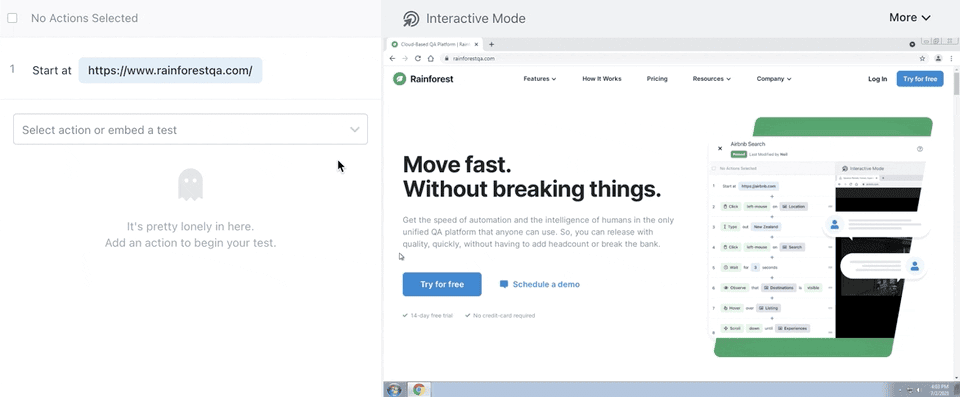
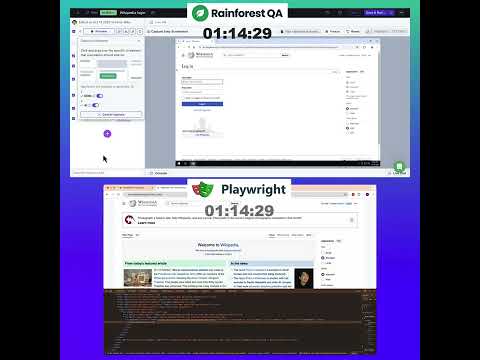
Additionally, Rainforest test managers use our no-code testing platform to create, run, and update tests up to 3x faster than code-based testing tools. That means fewer bottlenecks and faster iterations.
@media only screen and (max-width:768px){.rapidload-yt-play-button-TVCRepJOPrg{width:42px!important;height:32px!important;}}.rapidload-yt-video-container-TVCRepJOPrg{position: relative;top: 0;left:0;width:100%;height:100%;display:flex;justify-content:center;background-color:black}.rapidload-yt-poster-image-TVCRepJOPrg{display:block;}.rapidload-yt-play-button-TVCRepJOPrg{position:absolute;top:50%;left:50%;transform:translate(-50%,-50%);width:85px;height:65px;background-image:url('data:image/svg+xml,%3Csvg width=%2740%27 height=%2730%27 viewBox=%270%200%2040%2030%27 fill=%27none%27 xmlns=%27http://www.w3.org/2000/svg%27%3E%3Crect x=%2712.1055%27 y=%278.10596%27 width=%2715.7895%27 height=%2714.2105%27 fill=%27white%27/%3E%3Cpath d=%27M31.6925 0.737305H8.30749C3.71938 0.737305 0 4.45669 0 9.04479V20.7348C0 25.3229 3.71938 29.0423 8.30749 29.0423H31.6925C36.2806 29.0423 40 25.3229 40 20.7348V9.04479C40 4.45669 36.2806 0.737305 31.6925 0.737305ZM26.0742 15.4586L15.1363 20.6753C14.8448 20.8143 14.5082 20.6018 14.5082 20.279V9.51941C14.5082 9.19195 14.8537 8.97972 15.1457 9.12774L26.0837 14.6705C26.4089 14.8353 26.4032 15.3017 26.0742 15.4586Z%27 fill=%27%23F61C0D%27/%3E%3C/svg%3E%0A');background-size:cover;cursor:pointer;z-index: 10000;}
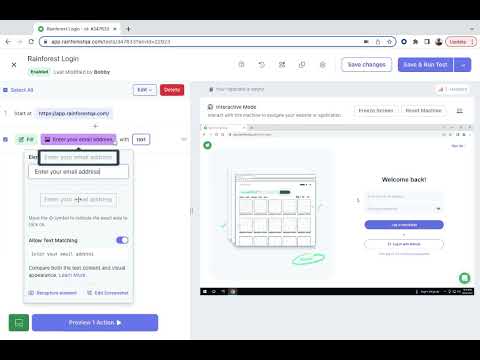
Here’s how test managers write tests inside Rainforest’s specialized software:
@media only screen and (max-width:768px){.rapidload-yt-play-button-2Qd3kJg_DTE{width:42px!important;height:32px!important;}}.rapidload-yt-video-container-2Qd3kJg_DTE{position: relative;top: 0;left:0;width:100%;height:100%;display:flex;justify-content:center;background-color:black}.rapidload-yt-poster-image-2Qd3kJg_DTE{display:block;}.rapidload-yt-play-button-2Qd3kJg_DTE{position:absolute;top:50%;left:50%;transform:translate(-50%,-50%);width:85px;height:65px;background-image:url('data:image/svg+xml,%3Csvg width=%2740%27 height=%2730%27 viewBox=%270%200%2040%2030%27 fill=%27none%27 xmlns=%27http://www.w3.org/2000/svg%27%3E%3Crect x=%2712.1055%27 y=%278.10596%27 width=%2715.7895%27 height=%2714.2105%27 fill=%27white%27/%3E%3Cpath d=%27M31.6925 0.737305H8.30749C3.71938 0.737305 0 4.45669 0 9.04479V20.7348C0 25.3229 3.71938 29.0423 8.30749 29.0423H31.6925C36.2806 29.0423 40 25.3229 40 20.7348V9.04479C40 4.45669 36.2806 0.737305 31.6925 0.737305ZM26.0742 15.4586L15.1363 20.6753C14.8448 20.8143 14.5082 20.6018 14.5082 20.279V9.51941C14.5082 9.19195 14.8537 8.97972 15.1457 9.12774L26.0837 14.6705C26.4089 14.8353 26.4032 15.3017 26.0742 15.4586Z%27 fill=%27%23F61C0D%27/%3E%3C/svg%3E%0A');background-size:cover;cursor:pointer;z-index: 10000;}
Rainforest validates your full user experience, not just isolated browser flows
Rainforest’s service is designed to test the full scope of the user experience.
Rainforest test managers use our testing software to create and run end-to-end tests inside fully virtualized environments — real Windows, Mac, Android, and iOS machines, not just browser containers. This allows them to test not only browser interactions but also anything visible on the screen across the entire device.
Because our service tests the complete real-world experience — not just isolated browser flows — we catch issues that many other quality assurance services overlook.
For instance, with the Rainforest testing software, test managers can create a test that:
- Completes a purchase flow inside your web application.
- Downloads the receipt from a confirmation page.
- Opens the downloaded file on the device.
- Verifies that the receipt displays the correct purchase details.
Here’s an example of a Rainforest test downloading and installing Brave Browser:

Read more: Top 5 functional testing services & what to look for
Rainforest automates UI test maintenance using AI
Instead of relying on brittle visual elements or selectors in your web application’s code, we built Rainforest with patent-pending AI trained on thousands of tests over the last 10 years. Using this training, our AI evaluates failed tests and can tell whether a change results from an update pushed by your team or a bug.
If your team pushes a deliberate change, our AI will automatically update the relevant test script to show the change. We don’t have to jump in, manually code updates, and bottleneck your releases for hours or days. Teams can ship updates and new features immediately.
Rainforest test managers review every AI update to maintain test reliability.
For example, say a “Checkout” button shifts 20 pixels to the left or a dropdown overlaps with a navigation menu — Rainforest’s AI recognizes these as likely visual regressions. It fails the test, flags the issue, and keeps the test script unchanged so the team can investigate the bug.
On the other hand, if the button label changes from ‘Checkout’ to ‘Buy Now,’ or the background color of a section is updated from light gray to white across the app, the AI identifies these as intentional design updates. It then updates the relevant test script to reflect the new label or style.
@media only screen and (max-width:768px){.rapidload-yt-play-button-Pbr8lUT8vZM{width:42px!important;height:32px!important;}}.rapidload-yt-video-container-Pbr8lUT8vZM{position: relative;top: 0;left:0;width:100%;height:100%;display:flex;justify-content:center;background-color:black}.rapidload-yt-poster-image-Pbr8lUT8vZM{display:block;}.rapidload-yt-play-button-Pbr8lUT8vZM{position:absolute;top:50%;left:50%;transform:translate(-50%,-50%);width:85px;height:65px;background-image:url('data:image/svg+xml,%3Csvg width=%2740%27 height=%2730%27 viewBox=%270%200%2040%2030%27 fill=%27none%27 xmlns=%27http://www.w3.org/2000/svg%27%3E%3Crect x=%2712.1055%27 y=%278.10596%27 width=%2715.7895%27 height=%2714.2105%27 fill=%27white%27/%3E%3Cpath d=%27M31.6925 0.737305H8.30749C3.71938 0.737305 0 4.45669 0 9.04479V20.7348C0 25.3229 3.71938 29.0423 8.30749 29.0423H31.6925C36.2806 29.0423 40 25.3229 40 20.7348V9.04479C40 4.45669 36.2806 0.737305 31.6925 0.737305ZM26.0742 15.4586L15.1363 20.6753C14.8448 20.8143 14.5082 20.6018 14.5082 20.279V9.51941C14.5082 9.19195 14.8537 8.97972 15.1457 9.12774L26.0837 14.6705C26.4089 14.8353 26.4032 15.3017 26.0742 15.4586Z%27 fill=%27%23F61C0D%27/%3E%3C/svg%3E%0A');background-size:cover;cursor:pointer;z-index: 10000;}
Rainforest makes it easy for anyone to pinpoint bugs with instant visual context
When tests fail, Rainforest provides the context your team needs to locate and fix the bug — speeding up bug resolution.

With every test run, Rainforest captures a full video recording of the user journey, along with detailed logs and timestamps. If a bug is detected, a test failure triggers the automatic creation of a Jira ticket (or your project management tool of choice), which includes:
- A high-resolution video of the failure in action.
- A clear visual indication of the exact step where the error occurred.
- Metadata such as browser type, device, and timestamp.
- Link to the specific test case and results dashboard.

This means software development teams no longer have to sift through test code, rerun scenarios, or guess what the user was doing at the time of failure. Instead, they can watch the issue unfold, replicate it instantly, and fix it with confidence.
By removing the guesswork and surfacing clear visual evidence, Rainforest reduces bug resolution times without adding extra work for your team.
Plus, anyone in your organization can log in to Rainforest, review test results in plain English, and understand exactly what went wrong and why.

Read more: Top 5 regression testing services & key factors to consider
Rainforest assigns dedicated test managers who integrate with your team
With Rainforest, you get two dedicated test managers who stay with your account long term. They learn about your web app, priorities, and quality standards — and get better at testing with every release. They also integrate directly into your workflows, join team stand-ups, and reply quickly to any updates, requests, questions, or test instructions.
Over time, they operate with minimal oversight, freeing up your engineering leaders to focus on building instead of overseeing QA.
Our test managers also work in your time zone and communicate in fluent English — whether you prefer Slack, Microsoft Teams, or anything else. They respond quickly, follow your testing processes, and keep feedback loops tight.
As your product evolves, your test managers grow with it, building institutional knowledge that leads to smarter testing, broader coverage, and more reliable results.
Get started
Book a call with our team to learn more about how Rainforest can help you outsource automated UI testing.
2\. QA Mentor

QA Mentor offers a comprehensive suite of QA solutions, including UI testing services tailored to various industries. Their global team is known for scalability and deep automated and manual testing expertise. QA Mentor’s UI testing integrates with broader QA strategies, ensuring functional and performance aspects are covered across devices and browsers.
However, their heavy reliance on frameworks like Selenium can result in tests that interact more with the application’s code than the UI itself. While this approach is efficient for catching logical errors, it may overlook visual regressions, layout shifts, or inconsistencies.
Teams relying solely on QA Mentor for usability testing services should consider complementing their strategy with testing tools focused on visual validation to catch design and accessibility flaws.
Alternatively, teams can opt for a UI testing service like Rainforest, which can test the UI directly.
3\. MuukTest

MuukTest offers automated UI testing services designed for small to medium-sized development teams. Their platform integrates into CI/CD pipelines and leverages AI to improve test coverage.
MuukTest uses a hybrid approach to UI testing, offering no-code test creation options and a robust foundation in code-based test automation tools like Selenium, Playwright, and Appium.
These frameworks simulate user actions to ensure that UI elements respond correctly across various platforms and devices. The tests are typically written in languages such as Java and JavaScript, providing flexibility and scalability for teams with more technical resources.
Although MuukTest is effective in catching code regressions like QA Mentor, their approach often emphasizes the application structure or the prototype’s codebase rather than visual correctness.
4\. Mindful QA
Mindful QA is a software testing company based in the U.S. that provides manual and automated UI testing services. Because the majority of their test personnel are based within the U.S., we like that they can work in your time zone and respond quickly.
Their community of manual testers focuses on testing the user experience, often catching usability issues that test automation may miss. However, like many manual testing providers, their feedback may rely more on expected user flows than comprehensive visual validation.
Additionally, because automated tests aren’t always scripted to interact deeply with UI layers, obvious bugs might go unreported. While Mindful QA is strong in real-world interface usage, incorporating a UI testing service like Rainforest helps catch layout or design flaws that aren’t visible through code-based tests alone.
5\. Testlio

Testlio offers enterprise UI testing services by combining in-house QA leadership with a global crowd-testing model. Their community of manual testers covers a wide range of devices and real-world scenarios.
Testlio uses different programming languages and testing frameworks to write and automate tests, such as Java, JavaScript, Python, C#, Selenium, Appium, Cypress, and Playwright. This flexibility allows teams to utilize the tools that best fit their existing tech stack. Testlio offers UI testing, UX testing, performance testing, accessibility testing, and end-to-end testing services.
The Testlio Platform also enables users to create, execute, and analyze automated tests and allows integration with third-party tools and CI/CD pipelines.
Testlio’s automated tests often focus on code structure and interaction logic rather than computer vision and image rendering. This can result in UI issues, like misaligned buttons or inconsistent font rendering, slipping past test coverage.
With Rainforest, we perform true automated UI testing by validating your web or mobile application’s UI directly — not the underlying code.
Outsource automated UI testing with Rainforest QA
Ready for faster, more reliable UI testing? Explore how Rainforest can help by scheduling a quick call.